

API and integrations
Everything the back office does is also available over a REST API, which the storefront and other systems use. This page is for the people who connect another system to Fincas: integrators, and the administrators who give them access. The design behind it is in Architecture.
Before you start:
- For reading the API reference: nothing; it is public.
- For an API key: someone who can run
manage.pycommands on the server (an operator). - For webhook subscriptions and connected accounts on the Integrations page: a staff login with the
core.change_integrationaccountpermission. The built-instaffrole does not include it; an administrator grants it to the people who wire integrations.
Find the API reference
Section titled “Find the API reference”Every instance publishes its own reference, generated from the running code:
| Address | What it is |
|---|---|
/api/docs/ |
Swagger UI: browse every endpoint and try requests |
/api/redoc/ |
The same reference as a single readable page |
/api/schema/ |
The OpenAPI 3.0 schema file, for code generators and API clients |
On the demo: demo.fincas.dev/api/docs/. The storefront’s API Docs link in its header goes to the same page.
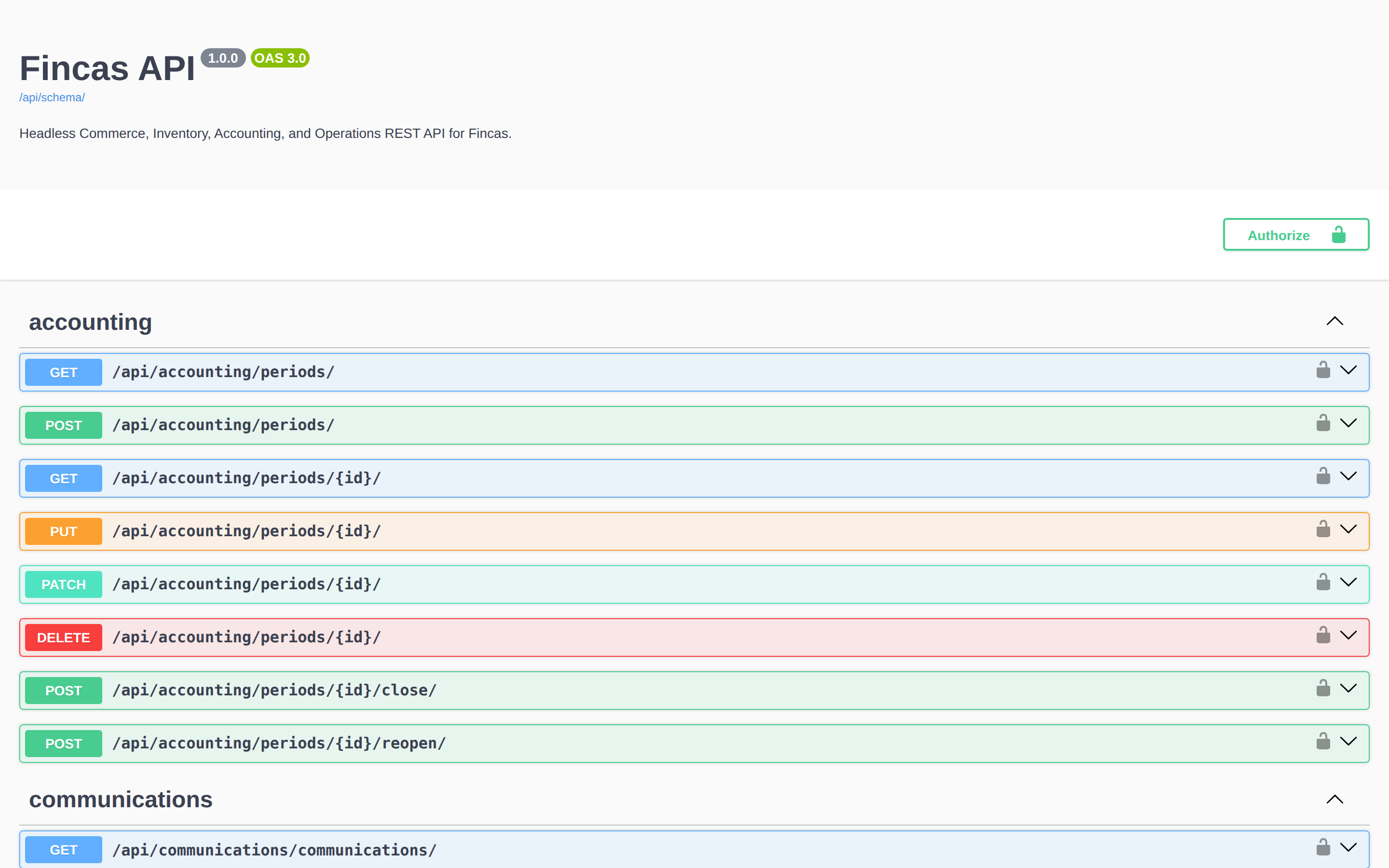
Things to know when reading it:
- Endpoints answer both at
/api/<area>/…(the form the schema lists) and at/api/v1/<area>/…. - Lists come in pages of 25:
count,next,previousandresults. Follownextuntil it is empty. - Record ids are UUIDs.
- Reading the public catalog (
/api/v1/products/products/, categories, brands) needs no sign-in and returns only products and variants that are active and visible on the website. Everything else needs one of the sign-ins below.
Choose how to authenticate
Section titled “Choose how to authenticate”| Caller | How it signs in | Acts as |
|---|---|---|
| A staff member trying things in the browser | The back-office session (sign in at /erp/ first) |
That staff user, with their roles |
| An integration (sync job, script, middleware) | Authorization: Api-Key <key>, or a short-lived bearer token minted from the key |
Its own service account, svc-<name>, never a person |
| The storefront | Authorization: Bearer <storefront token> from POST /api/v1/core/auth/storefront-token/ |
The storefront identity: read the catalog and place a guest order, nothing else |
| A signed-in shop customer | Authorization: Bearer <token from the sign-in provider> on /api/v1/portal/customer/… |
That customer’s own account |
| A provider calling back (ClickUp, Klaviyo, …) | A signed request to /api/v1/integrations/<provider>/<account id>/webhook/, checked against the connected account’s webhook secret |
The connected account |
An integration always gets its own key on its own service account. Don’t reuse a staff login or the storefront token for it.
Give an integration an API key
Section titled “Give an integration an API key”API keys are issued on the server, not in the back office. An operator runs the command; the integrator receives the key.
-
Decide what the integration may do, and make sure a service role with exactly those permissions exists in the deployment’s
GOLDEN_ROLESsetting ("kind": "service"). See Roles. -
Run, on the server:
Terminal window python manage.py create_api_key --name crm-sync --role crm-syncThis creates the service account
svc-crm-sync(no password, not staff) if it does not exist, adds it to the role, and prints the key once. Only a hash is stored, so a lost key cannot be shown again; issue a new one. -
Add options as needed:
--expires-in 90d(or12h,4w) to give the key an end date.--company <id or name>to pin the account to a company. It is required once the server has more than one company, and an account that is not pinned to a company cannot write.--key-name crm-sync-2026q4to issue a second key for the same service, for rotation.
-
Hand the key to the integrator through your secret store. It goes in every request as
Authorization: Api-Key <key>.
An integration that prefers bearer tokens can exchange its key for one:
curl -X POST https://erp.example.com/api/v1/core/auth/token/ \ -H "Authorization: Api-Key $FINCAS_API_KEY" \ -H "Content-Type: application/json" -d '{}'The answer holds token and expires_in_s (one hour by default; ask for a different lifetime with
{"lifetime_s": 600}). Send it as Authorization: Bearer <token>. A token never outlives its key.
This endpoint allows 30 requests a minute from one address, so reuse a token until it expires.
To retire a key, run python manage.py revoke_api_key --name <key name> (or --service <name> for every
key of one service). The key and every token minted from it stop working at once.
Receive outbound webhooks
Section titled “Receive outbound webhooks”Fincas can POST an event to your URL when something happens: an order is placed or changes status, a payment completes, stock changes, a customer or party is created, merged or erased, a deal moves, a task is completed, and more. The full list of events and the fields each one carries is in Webhooks.
- Open Admin → Integrations and scroll to Webhook subscriptions.
- Open Add a webhook subscription. Enter the Target URL and a Description. Leave Signing secret empty to have one generated.
- Tick the Events to receive, or all (
*). - Click Add subscription. The confirmation message shows the signing secret once. Copy it into your receiver’s configuration now; it is never displayed again.
- Click Send test delivery. Your receiver gets one
webhook.pingrequest, and the subscription shows “Last delivery” with the response code. - Use Disable / Enable to pause and resume a subscription.
On the public demo these buttons are turned off, so that nobody can point the demo’s events at an outside address.
Subscriptions can also be managed over the API at /api/v1/webhooks/subscriptions/, and every
delivery attempt is listed at /api/v1/webhooks/deliveries/. To keep receiving an older payload
format for an event, subscribe through the API with a version pin such as customer.registered@1.
Versions and their timeline are in Webhooks: payload versions.
Verify every delivery
Section titled “Verify every delivery”Each request carries these headers:
X-Golden-Signature:sha256=followed by the HMAC-SHA256 of the raw request body, keyed with the subscription’s signing secret.X-Golden-Timestamp: when this attempt was sent.X-Golden-Delivery-Id: the delivery’s id, the same on every retry.X-Golden-Event: the event name.
Accept a request only when the signature matches and the timestamp is no more than 300 seconds old and not in the future. Check the signature before parsing the JSON:
import hashlib, hmac
def is_valid(raw_body: bytes, signature_header: str, secret: str) -> bool:    expected = "sha256=" + hmac.new(secret.encode(), raw_body, hashlib.sha256).hexdigest()    return hmac.compare_digest(expected, signature_header or "")
Node and Go versions are in Webhooks: signature verification.
Know how delivery and retries work
Section titled “Know how delivery and retries work”Nothing that talks to another system runs while a user waits. A change writes a row to the outbox
in the same database transaction, and a separate worker, manage.py process_outbox, sends it later.
The worker must run all the time (or every minute from a scheduler); see
Deployment. If it is stopped, events queue up and none are sent.
For each delivery the worker makes one attempt at a time:
- A
2xxanswer means delivered. - A
4xxanswer means refused: it is not retried. Answer4xxonly when the request is bad for good (for example a failed signature check). - A
5xxanswer, a timeout (10 seconds) or a connection error is retried, waiting longer each time (30 seconds, 1 minute, 2 minutes, … up to about 2 hours), ten attempts over about four hours. - After that the delivery is dead. An operator lists dead rows with
python manage.py outbox list --state deadand sends them again, after fixing the receiver, withpython manage.py requeue_outbox <id>.python manage.py check_outboxexits with an error while any dead row exists, which suits a monitoring check.
A dead endpoint retries on its own and never holds up other subscribers. Deliveries are not in order
across events, so use the timestamps in the payload (updated_at, changed_at, occurred_at) to decide
which change is newest.
Make retries safe (idempotency)
Section titled “Make retries safe (idempotency)”Delivery is at least once: after a crash, your receiver can get the same delivery twice. Store the
X-Golden-Delivery-Id values you have processed and skip any you have seen. Some events have their own
keys to deduplicate on (for example change_id on deal stage events); see Webhooks.
In the other direction, the API lets you retry a create without making a duplicate on these endpoints:
| Endpoint | Send |
|---|---|
POST /api/v1/orders/orders/ (create an order) |
Idempotency-Key header, or external_id in the body |
POST /api/v1/payments/payments/ (record a payment) |
Idempotency-Key header, or idempotency_key in the body |
POST /api/v1/purchasing/purchase-orders/<id>/receive/ (receive goods) |
Idempotency-Key header, or idempotency_key in the body |
A repeated request with the same key returns the record from the first one, with status 200 instead of
201. Requests without a key always create a new record. Other endpoints have no such protection, so
check before you retry a failed create there.
Connect provider accounts
Section titled “Connect provider accounts”The CRM integrations (ClickUp, Klaviyo, Gmail, Aircall, Google Ads) are set up per company under Admin → Integrations → Connected accounts. Which providers are offered depends on the plugins your deployment installs, and storing credentials needs encryption keys configured on the server.
- Under Connected accounts, pick the provider in Add an account and click Add. The account starts disabled.
- Under Credential, choose the kind, paste the value into Secret (write-only) and click Store credential. A stored secret is never shown again; the page lists only its kind and date.
- Fill in Settings (JSON, no secrets) if the provider needs list ids or mappings, and click Save settings.
- For Gmail, each staff member connects their own mailbox with Connect my account.
- Click Test connection, then Enable.
- If the provider calls back, give it the webhook URL shown on the account.
What each provider needs, and what to do when one stops, is in Connected accounts; the full first-time wiring is in Wiring the CRM adapters.
Check your work
Section titled “Check your work”/api/docs/loads, and a request with your key to an endpoint the role allows answers200.- The same key gets
403on an endpoint the role does not allow. - Send test delivery reaches your receiver, the signature verifies, and the subscription shows “Last delivery … ok”.
- After a real change (for example placing an order), a delivery for that event appears in
/api/v1/webhooks/deliveries/.
If something goes wrong
Section titled “If something goes wrong”401 on every request. The key is wrong, revoked or expired, or the header is not
Authorization: Api-Key <key> (a bearer token needs Bearer). Bearer tokens expire after an hour by
default; mint a new one.
403 on a request. The service account’s role does not allow that action, or the account is not
pinned to a company and the request writes. Reissue the key with the right --role and --company.
429 from the token endpoint. More than 30 token requests a minute from one address. Cache the
token until it expires.
The test delivery works, but real events never arrive. Event delivery is off
(WEBHOOKS_DELIVER_ON_SIGNALS), the outbox worker is not running, or the subscription does not list
that event.
Deliveries stopped after a receiver outage. They ran out of retries and are dead. Ask the operator to requeue them once the receiver is back.
The same event arrives twice. Expected now and then (at-least-once delivery). Deduplicate on
X-Golden-Delivery-Id.
Your receiver rejects valid-looking requests. It parsed and re-serialized the JSON before checking the signature, or its clock is off. Verify against the raw body bytes, and keep the server clock in sync, because timestamps older than 300 seconds are rejected.
There is no “Add a webhook subscription” or “Add an account” on the Integrations page. Your login
lacks core.change_integrationaccount. For connected accounts, the deployment may also have no provider
plugins installed.